How a Bluetooth Receiver for Mixer Simplifies Your Workflow
Quick answer: A Bluetooth receiver can add phone, tablet, or computer playback to a mixer without running an audio cable back to the source. The reliable workflow is to match the receiver output to a compatible mixer input, confirm the codec at both ends, set levels conservatively, and test placement before a rehearsal or event.
Bluetooth is useful for walk-in music, reference tracks, presentations, and other playback. It should not be treated as a guaranteed zero-latency path for live monitoring or time-critical performance.
What a Bluetooth receiver does in a mixer setup
The signal path is simple: a source device sends audio over Bluetooth, the receiver converts that stream to an audio output, and the mixer routes the signal to a bus or main output. Bluetooth Classic is the Bluetooth radio commonly used for continuous audio streaming, according to the Bluetooth SIG technology overview.
- Source: phone, tablet, computer, or a separate Bluetooth transmitter.
- Wireless link: the source and receiver negotiate a Bluetooth audio codec they both support.
- Receiver output: analog or digital audio, depending on the receiver.
- Mixer input: an input that matches the receiver’s connector and signal requirements.

Mixer connection checklist
- Identify the receiver output. Check whether it provides XLR, RCA, 3.5 mm, optical, coaxial, or USB audio.
- Identify a compatible mixer input. Match both the connector and the signal type described in the receiver and mixer documentation.
- Start with levels down. Lower the channel gain and fader before connecting or powering the receiver.
- Pair one source. Keep the source near the receiver during initial setup and confirm the connected device name.
- Route and test. Play a familiar track, raise the input gradually, and confirm the intended bus or main output.
- Test the real position. Walk the source to its normal location and listen for dropouts before the session begins.
Choose the receiver by output, not only by Bluetooth version
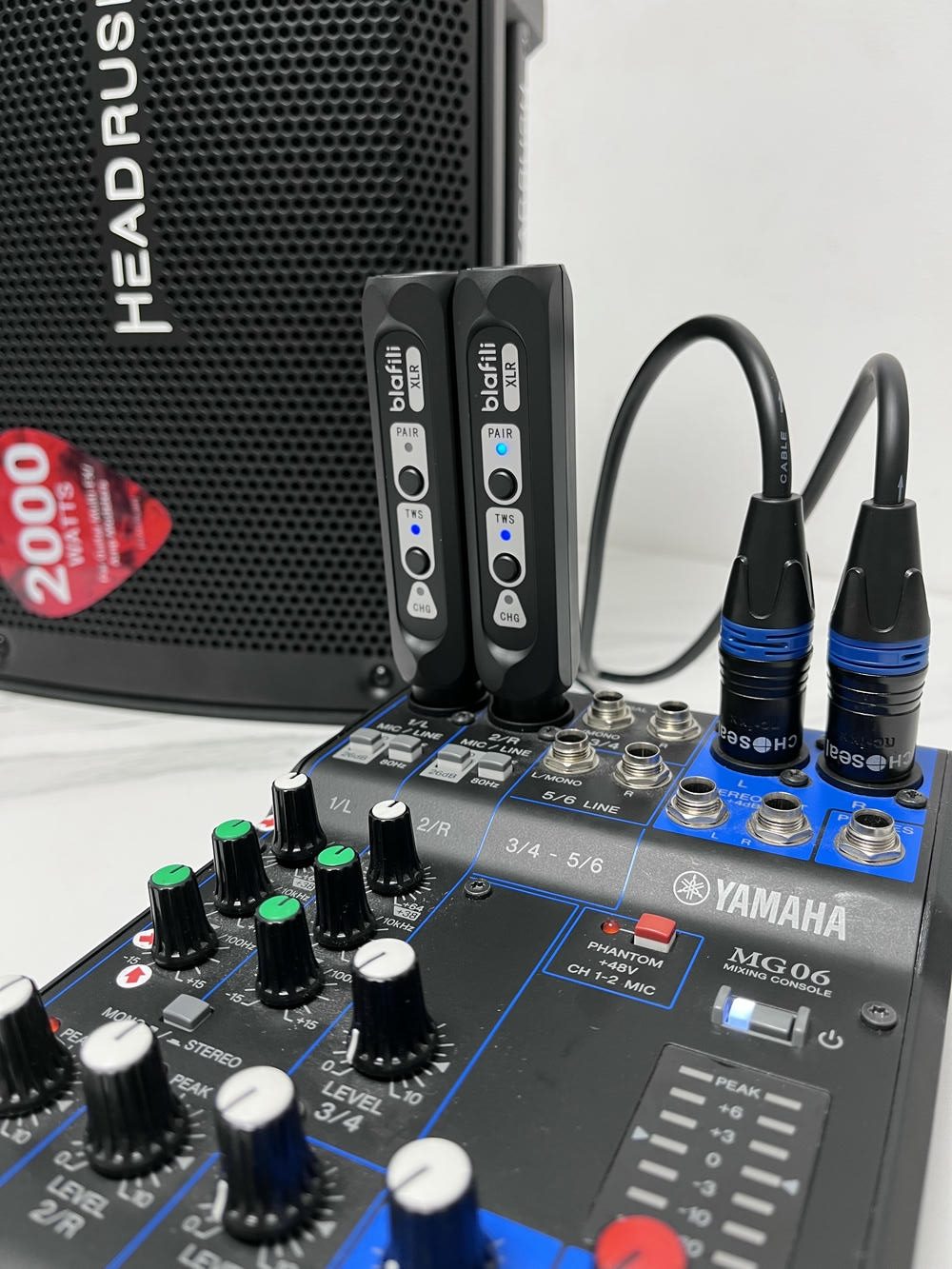
An XLR-output receiver can be convenient when the mixer or powered speaker has a compatible XLR input. RCA or 3.5 mm outputs may be simpler for a stereo line input. A digital output is relevant only when the mixer or external converter accepts the same digital format.
Do not assume that two connectors are electrically compatible just because they fit. Check the specified output level, the intended mixer input, and the equipment manuals. If the mixer input offers phantom power, follow the receiver and mixer instructions rather than guessing.
Codec and latency: verify the complete path
A receiver can use only a codec supported by the source or transmitter as well. For example, Qualcomm states that aptX HD is designed for 24-bit audio over Bluetooth, but an aptX HD label on the receiver does not make an incompatible source use that codec.
Delay depends on the source, codec, buffering, receiver, mixer, and application. Test the exact source-receiver pair for video playback. For live instruments, karaoke, cue mixes, or performer monitoring, use a wired path unless the measured delay is acceptable for that specific job.
Placement and interference
Bluetooth operates in the 2.4 GHz band and uses frequency hopping. That design improves coexistence, but it does not eliminate the effects of obstacles, metal racks, crowded radio environments, or poor antenna placement.
- Keep the receiver in the open instead of behind a metal mixer case or amplifier.
- Establish a short-range baseline before testing the full room.
- Change one variable at a time: source position, receiver orientation, nearby wireless equipment, or physical obstacles.
- Repeat the route during a realistic rehearsal, because the radio environment can change when the room is occupied.
When the Blafili XLR receiver fits
The current Blafili XLR Bluetooth Audio Receiver product page lists Bluetooth and USB-C inputs, one balanced XLR male output, and support for aptX HD, aptX Low Latency, aptX, AAC, and SBC. It also lists a 16-bit/48 kHz USB DAC mode. Those features make it a candidate for a mixer or powered speaker with a compatible XLR input.
Check the live specification and both device manuals before connecting. Product-page range and battery figures are conditions-based claims, not guarantees for every venue, so test the actual room and source device.
Troubleshooting
- No sound: confirm the paired source, receiver power, selected mixer input, channel mute, routing, and output bus.
- Distorted sound: lower the source or channel gain and verify that the receiver output matches the intended mixer input.
- Dropouts: move the source closer, expose the receiver antenna area, and test away from obstacles and busy wireless equipment.
- Unexpected delay: identify the negotiated codec if the devices expose it, close unnecessary source applications, and compare with a wired input.
- Wrong device reconnects: remove stale pairings and pair only the source intended for the session.
Bottom line
A Bluetooth receiver simplifies mixer playback when the signal direction, output, input, codec support, and placement are all verified. Use it for convenient playback after a real-room test; keep a wired path for tasks where predictable latency and continuity are essential.