

What is LDAC? It is Sony’s audio coding technology for Bluetooth, built to carry more musical detail across a wireless link than the standard SBC codec can manage. Where SBC tops out around 328 kbps, LDAC runs three adaptive modes at 330, 660 or 990 kbps, and the top mode carries sample formats up to 24-bit/96 kHz. Android phones have shipped with the encoder since version 8.0. This page covers the LDAC codec from name to numbers: where it sits in a Bluetooth chain, how its modes behave, and when the extra bitrate is worth chasing.
What Is LDAC? The Name and the Technology
LDAC is an audio codec: software that prepares music for its trip over Bluetooth. The sending device encodes the original file into a stream sized for the radio link, and the receiving device decodes that stream back into audio ready for a DAC. Bluetooth music rides on a profile called A2DP, and LDAC is one of the optional codecs that profile can carry; the official A2DP specification documents the framework underneath.
A codec exists because the radio has a budget. The 2.4 GHz link moves a limited amount of data per second, and it also carries pairing traffic, retries and other housekeeping. Raw 24-bit/96 kHz stereo would need several megabits per second, far beyond what the radio can spare. So the codec compresses the music to fit, and every codec answers the same question in its own way: what do we keep, and what do we throw away?
A walkthrough of the chain shows where the name belongs. A track leaves your phone as a file, gets re-encoded into the codec stream, crosses the 2.4 GHz radio, is decoded at the receiver, then flows through a DAC into your amplifier. LDAC touches only that middle encoding step. It is not a version of Bluetooth, not a faster radio and not a fix for a weak connection. It is a packing method for the music itself, one link in a chain whose other links it cannot reach.

That leaves the question of what LDAC means. Sony treats the name as a brand for the technology and publishes no official expansion of the letters, so long forms you may find online did not come from the company. Any version built around the word lossless misdescribes the codec, which discards data by design. The plain reading, and the safest one, is that LDAC is simply what Sony calls it.
How Does LDAC Work Over Bluetooth?
Every Bluetooth codec obeys one rule: both devices have to speak it. When a phone connects, the Android stack negotiates the best codec the two endpoints share, and Android’s Bluetooth documentation lists LDAC among the codecs the platform has carried since Android 8.0. A phone with LDAC on board still connects in SBC or AAC when the far side lacks the decoder, because the negotiation has nothing else to agree on.
This negotiation is why codec shopping starts with the spec lists on both sides. A receiver without an LDAC decoder makes the phone’s support irrelevant, and a phone without LDAC leaves the decoder in the receiver waiting for company. Neither side can carry the codec alone; the badge on one box is only half of the contract.
Once an LDAC link is running, the codec adapts to the airwaves. Sony’s LDAC overview documents three transmission modes at 330, 660 and 990 kbps, with the top mode moving roughly three times the data of SBC on Sony’s 328 kbps comparison basis and carrying sample formats up to 24-bit/96 kHz. In adaptive operation the link steps between those modes as conditions change: crowded spectrum pulls it down toward 330 kbps, clear air lets it climb back.
The stepping happens without any prompting. Walk from a quiet study into a kitchen packed with Wi-Fi and microwave interference, and an adaptive link drops a mode or two, then recovers when the noise clears. A listener who checks mid-track may catch the codec resting at 660 kbps in a room that held 990 kbps an hour earlier. The figure quoted in a review is the ceiling the gear reached, not a permanent seat.
Source gear can bias the choice. Sony devices ship a playback-quality setting that leans toward sound quality or connection stability, and Sony’s help guide walks through one such menu. Many Android phones expose a codec picker under developer options for anyone who wants manual control. Left alone, the link chases the highest rate it can hold.
LDAC Bitrates at a Glance
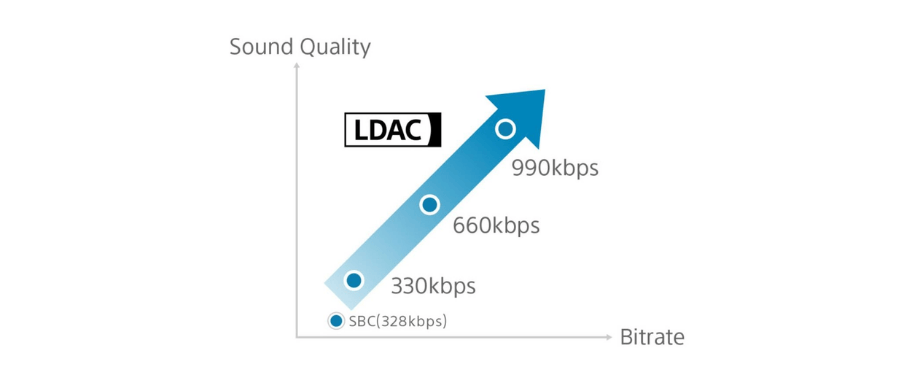
What pushes a link down the ladder? Distance, walls and competition for spectrum. Bluetooth shares the 2.4 GHz band with Wi-Fi, so a router sitting between phone and receiver costs real bitrate, and keeping the two devices in one room with line of sight is the cheapest upgrade any codec receives. The three modes trade stability against detail.
| LDAC mode | What it favors | What to expect on the link |
|---|---|---|
| 330 kbps | Stability | Holds on crowded or weak links; the least data per second of the three |
| 660 kbps | Balance | More detail than 330 kbps while keeping most of the connection margin |
| 990 kbps | Detail | Carries sample formats up to 24-bit/96 kHz; needs clean spectrum to sustain |
Read the ceiling correctly. Only the 990 kbps mode carries up to 24-bit/96 kHz sample formats, and the link reaches that mode when the radio can hold it, not on demand. A spec sheet quoting the numbers without those two conditions is telling half the story.
The modes map cleanly onto listening situations. A quiet room with the phone a few meters from the receiver holds 990 kbps without complaint. An apartment dense with neighboring Wi-Fi settles toward 660 kbps for most of a session. A crowded commute or a floor of concrete and steel leans on 330 kbps, where the stream size resembles what the competition moves while the connection stays polite.
LDAC vs SBC, aptX and AAC

Numbers put the LDAC codec in context. SoundGuys’ codec reference rounds up the bitrate ceilings, and codec makers publish their own figures: aptX HD peaks at 576 kbps, classic aptX runs at 352 kbps, and AAC commonly lands near 250 kbps over Bluetooth.
| Codec | Max bitrate over Bluetooth | Typical ecosystem | When it matters |
|---|---|---|---|
| SBC | About 328 kbps | Every Bluetooth audio device | The mandatory fallback when nothing else overlaps |
| AAC | About 250 kbps | iPhones, iPads, most headphones and receivers | Apple sources, plus catalogs already delivered in AAC |
| aptX | 352 kbps | Many Android phones and wireless audio gear | A steady mid-rate option on supported pairs |
| aptX HD | 576 kbps | Selected phones, headphones and receivers | A middle step toward LDAC territory |
| LDAC | 990 kbps | Android 8.0+ sources with licensed decoders | Maximum detail from better-than-CD sources on clean links |
Sony’s comparison basis deserves a note. The three-times-SBC figure pits the 990 kbps ceiling against SBC’s 328 kbps ceiling, and both numbers are peaks the gear reaches for, not averages any link holds all day.
No row of that table wins on its own. The codec a link runs is the intersection of what the phone sends and what the receiver decodes, which is why two listeners with the same receiver can land on different codecs. For the pairing most shoppers face, how AAC and LDAC compare on the same system works through the decision with both device ecosystems in mind.
Which Devices Support LDAC?
Sony contributed the LDAC encoder to the Android Open Source Project, so the platform has carried the codec since Android 8.0. Inclusion in the source tree does not put it on every handset: device makers configure which codecs their builds expose, and a few ship without it. Where present, LDAC pairs with a capable receiver through the standard Bluetooth settings, no extra apps involved.
Apple gear sits outside the list. iPhones and iPads do not support LDAC; they send Bluetooth audio in AAC. An iPhone paired with an LDAC-capable receiver simply connects in AAC, and the LDAC badge on the box waits for an Android visitor.
The receiving end carries equal weight. Headphones, speakers and home-audio receivers need a licensed LDAC decoder, which is why the codec appears on selected gear instead of across the board. A dedicated receiver like the blafili B3 Bluetooth receiver exists for this gap: it decodes LDAC and hands the music to an existing amplifier, and it carries a 4.89 rating across 186 reviews.
Checking support takes a minute and prevents a mismatch. The codec list in a receiver’s specifications tells you what the far end decodes, and on many Android phones the codec in active use appears under the settings gear for a paired device. Confirm both ends before paying extra for LDAC hardware; support on each side is what turns a spec sheet number into a mode your link actually runs.
Is LDAC Lossless?
No, and the distinction matters more than any bitrate figure. LDAC is a lossy codec: the encoder discards information to fit the stream into its modes, and the decoder rebuilds an approximation at the far end. The 990 kbps mode spends roughly three times the data SBC gets, which buys a more faithful approximation, not a bit-perfect copy.
The “up to 24-bit/96 kHz” line deserves the same care. It describes the sample formats the 990 kbps mode can carry, covering sources mastered beyond CD’s 16-bit/44.1 kHz. It does not promise that every bit of such a file survives the trip. A 24-bit/96 kHz source streamed over LDAC arrives as a well-fed lossy reconstruction of that source.
Source quality is often the real ceiling. Streaming catalogs in their standard tiers deliver lossy files at rates no radio link can improve, so everyday streams operate well below what the LDAC codec offers. Local libraries and service tiers that deliver better-than-CD audio are where the headroom has room to work. On the audibility question, whether LDAC is better than AAC for music lovers weighs the evidence.
One more wrinkle: the radio codec is the second encode, not the first. A streamed track already left its service in AAC or another lossy format, and LDAC re-encodes that reconstruction for the airwaves. A local file skips that initial lossy step, one reason local libraries flatter the codec more than streams do.
When Does LDAC Actually Matter?
LDAC earns its keep under a specific set of conditions. The source needs detail worth carrying: local files at 24-bit/96 kHz or a service tier delivering better-than-CD streams. The airwaves need to be quiet enough for the link to hold its upper modes, which favors a home room over a packed train. The far end needs gear that rewards the input, meaning a capable DAC, a clean amplifier and speakers that resolve fine detail. Fall short anywhere in that chain and the 990 kbps badge becomes decoration.
Casual listening sits at the other pole. Everyday streaming through headphones or a kitchen speaker asks far less of a link than LDAC supplies, and SBC or AAC covers it comfortably. A well-mastered stream through good speakers still sounds like well-mastered music; the codec badge is one input among several. The same money spent on better speakers, a quieter placement or a cleaner DAC chain moves the needle further than a codec name does.
Latency has its own codec. LDAC optimizes for quality, not delay, so movies and gaming pair better with aptX Low Latency, a codec built for a ~40 ms class of delay. Music listening rarely registers the difference.
The receiver is the piece you actually choose. What an LDAC Bluetooth receiver adds to a home stereo covers the benefits side, and connecting an LDAC receiver over optical TOSLINK covers one clean way to wire it. Pick a receiver that decodes what your phone sends, match the outputs to your amplifier, and let the LDAC codec run where conditions support it.
Curious how LDAC actually sounds next to aptX HD or plain SBC? Try the listening lab — the same tracks through every codec, level-matched and ready for your ears.