

An amplifier or a pair of powered speakers with no radio inside gets a second life from one small box: the LDAC Bluetooth receiver. It catches the stream from your phone, decodes Sony’s bandwidth-heavy LDAC codec at up to 990 kbps, and hands your amplifier a line-level signal over RCA, XLR or a digital cable. The upgrade costs a fraction of replacing gear that already sounds right.
This page explains what these receivers do, how LDAC differs from the codecs standard Bluetooth uses, what to check before buying, and where the honest limits sit, with a worked spec example and a short setup sequence at the end.
What Is an LDAC Bluetooth Receiver?
An LDAC Bluetooth receiver is a receive-only audio device: a Bluetooth radio, a codec decoder and a digital-to-analog converter in one chassis, with analog and digital outputs for the system you already own. Your phone stays the sender. The box sits where a CD player or an outboard DAC would sit, so the amplifier, the speakers and the cables downstream stay exactly as they are.
The Bluetooth chip inside a phone or a smart speaker gets designed around calls, cost and battery life. A dedicated receiver works from a different brief. Its radio section carries a proper antenna, sometimes removable, its DAC and output stage are built to feed an amplifier, and its back panel reads like a preamp’s: RCA, XLR, optical, coaxial.
In a living room the job looks concrete. The receiver plugs into the amplifier’s inputs, draws power from a USB supply, and the phone in your pocket becomes the source component. The antenna sits on stationary gear instead of inside a pocketed phone, and the output stage feeds line level rather than a tiny speaker amp.
The codec deserves its own page: what the LDAC codec is and how it works covers the encoding side. The short version for buyers: LDAC is Sony’s audio coding technology for Bluetooth, included in the Android open-source base since version 8.0 and licensed into selected receiving hardware. Phone and receiver settle on a codec at pairing, and LDAC only runs when both ends bring support.

How LDAC Streaming Works: Three Adaptive Modes
Sony built LDAC to move more data across Bluetooth than the baseline codecs spend. The technology runs three transmission modes at 330, 660 and 990 kbps, and the top mode carries sample formats up to 24-bit/96 kHz. On Sony’s comparison basis, 990 kbps is about three times the 328 kbps ceiling of SBC, the mandatory fallback codec.
Those three figures are steps, not a menu you order from. The link adapts as conditions change: it climbs toward 990 kbps on a clean radio path and steps down to 660 or 330 kbps when the 2.4 GHz band gets crowded. Nothing in the audio announces which step is active, which is why verifying the setting after pairing matters. A receiver with a display can show the live step, which turns that verification into a glance.
Codec choice is a two-sided decision made at pairing. Android’s Bluetooth stack negotiates the strongest codec both endpoints support, and Google’s documentation lists LDAC among the codecs Android has carried since version 8.0. Phone makers decide what ships enabled, so support varies across models. When one side lacks LDAC, the pair settles on a common fallback such as aptX HD, AAC or SBC, which is why an LDAC Bluetooth receiver reaches its top mode only when the sending phone brings LDAC too.
The Benefits That Hold Up
The clearest benefit is subtraction: nothing leaves your rack. A receiver that decodes LDAC gives an amplifier, a pair of powered monitors or an outboard DAC a wireless input while every piece keeps its place in the chain. Compared with replacing amplification or speakers to get wireless features, the receiver is the far cheaper route, and it keeps the sound of a system you chose on purpose. If the system changes later, the receiver simply moves to the next amplifier’s inputs.
Bitrate headroom is the second benefit, and it pays off only with the right sources. The 990 kbps mode carries up to 24-bit/96 kHz, so detailed local files arrive at the DAC with less of their content trimmed at the radio step. LDAC remains a lossy codec: it spends data generously rather than skipping compression. Services that deliver ordinary lossy streams cap the upside themselves, a point the pitfalls section revisits.
Graceful fallback is the quiet third benefit. Because negotiation happens at pairing, the same receiver serves an Android phone at LDAC, an iPhone at AAC and an aging tablet at SBC with nothing to reconfigure. Buying LDAC-capable hardware raises the ceiling for the phones that can reach it and changes nothing for the rest. Listeners deciding whether the gap is worth chasing can read whether LDAC is better than AAC for music lovers before spending anything.
LDAC vs Standard Bluetooth: What the Bitrate Ladder Shows
“Standard Bluetooth” in practice means SBC, the codec every Bluetooth audio device falls back to, plus whichever optional codecs a manufacturer licenses. All of them ride on A2DP, the Bluetooth audio distribution profile. The ladder below shows where the common codecs land; independent codec measurements and manufacturer spec sheets back the figures.
| Codec | Max bitrate | Where you find it | When it matters |
|---|---|---|---|
| SBC | ~328 kbps | Every Bluetooth audio device | The universal fallback for casual listening |
| AAC | ~250 kbps | iPhones, iPads, most earbuds | The ceiling whenever an Apple device sends |
| aptX | 352 kbps | Many Android phones, selected receivers | A middle step on the Android side |
| aptX HD | 576 kbps | Selected Android phones and audio gear | Higher-detail listening without LDAC |
| LDAC | Up to 990 kbps | Android 8.0+ phones, licensed receivers | Top bandwidth for 24-bit/96 kHz sources |
Qualcomm lists aptX HD at 576 kbps, the strongest tier below LDAC on the ladder. Read every number as a ceiling, not a constant: the negotiated codec and the live bitrate both depend on the two devices and the air between them. The Apple side of the table gets a deeper treatment in how AAC and LDAC compare head to head.
The ladder also explains most mismatch complaints. An LDAC Bluetooth receiver paired with an iPhone stays on AAC no matter what the box decodes, because the negotiation finds no LDAC on the sending side. An LDAC phone paired with an LDAC receiver on a congested link hears stepping, not the figure printed on the packaging. Knowing which side sets the limit turns a support ticket into a settings check.
What About Latency?
LDAC optimizes for bandwidth, not delay. Latency-sensitive work belongs to aptX Low Latency, built for roughly 40 ms-class delay, and a receiver that decodes both codecs covers both situations; the worked example below decodes everything on the ladder. For music through a stereo, LDAC’s delay behaves like any Bluetooth link: present, steady and rarely noticed.
A Five-Point Buying Checklist
The receiver market mixes serious designs with repackaged dongles, so a short checklist beats a brand hunt. Run any product page through these five checks.
- The full codec list. LDAC alone strands your second phone. Look for it alongside aptX HD, aptX, AAC and SBC so every device in the house negotiates its top option.
- Outputs that match your gear. RCA for integrated amps, XLR for balanced monitors, optical or coaxial for a DAC or processor. Output formats vary widely across the category: the blafili 6dot35 ($44.99) ends in a 1/4-inch TRS plug aimed at mixer and instrument-amp inputs, though its codec list runs aptX HD down to SBC with no LDAC. For digital wiring, using an LDAC receiver’s SPDIF optical output explains the connections.
- A named DAC. The converter defines the analog feed. Published silicon like the ESS ES9018K2M, with measurable distortion and noise figures, signals a design meant for amplification rather than an afterthought.
- Antenna and range. A removable antenna, commonly on an RP-SMA thread, extends the clean-link range that keeps LDAC near its top mode. Between holding 990 kbps and stepping down often sits nothing more than radio path.
- The power arrangement. Some receivers carry internal batteries, others draw from USB. Battery models travel to rehearsals and sessions; USB-powered boxes live beside the amplifier and draw from the same outlet as the rest of the stack.
One habit pays for itself: test every phone you plan to use inside the return window, and keep the product page’s codec table saved. Codec support hides in manufacturer footnotes more often than any other spec on the sheet.
Is an LDAC Bluetooth Adapter the Same Thing?
Search behavior, not engineering, split the vocabulary. Product listings shuffle the same words into titles like “LDAC Bluetooth adapter” and “Bluetooth receiver LDAC”, and in this category both phrasings describe one class of device: a receive-only box that decodes at the amplifier end. Some catalogs lean toward adapter for pocket-sized battery models and receiver for desktop boxes, and the overlap is close to total. Search both words, then read the spec table, because the word order in the title carries no technical meaning.
Two naming traps cause real trouble. A listing that says transmitter describes the opposite direction, sending audio from your mixer toward Bluetooth headphones rather than receiving. And a receiver can hold the LDAC license yet silently run a lower mode, or a different codec, when the link is weak. Sony’s help guide walks through checking and switching the LDAC playback-quality setting on Sony hardware; on Android, the developer options panel names the negotiated codec after pairing.
Setting One Up in Four Steps
A new receiver goes from box to music in four steps.
- Wire the output. Run RCA, XLR, optical or coaxial from the receiver to the amplifier or DAC, then power the receiver from USB or its battery.
- Pair. Select the receiver in your phone’s Bluetooth menu; the two sides negotiate a codec on their own.
- Confirm LDAC. On Android, open Settings, tap About phone, then tap the build number repeatedly until developer mode unlocks. Under Developer options, the Bluetooth audio codec entry shows the negotiated codec and lets you prefer LDAC.
- Feed it real material. Detailed local files or a lossless-tier stream give the top mode something to carry; a receiver with a display shows the incoming rate.
Dropouts trace back to the radio path in most cases: shorten the distance, move the receiver clear of the Wi-Fi router, or let the adaptive modes find a lower step on their own. None of that changes the pairing or the codec preference, and undoing an experiment takes one menu tap.
One Worked Example: the blafili B3
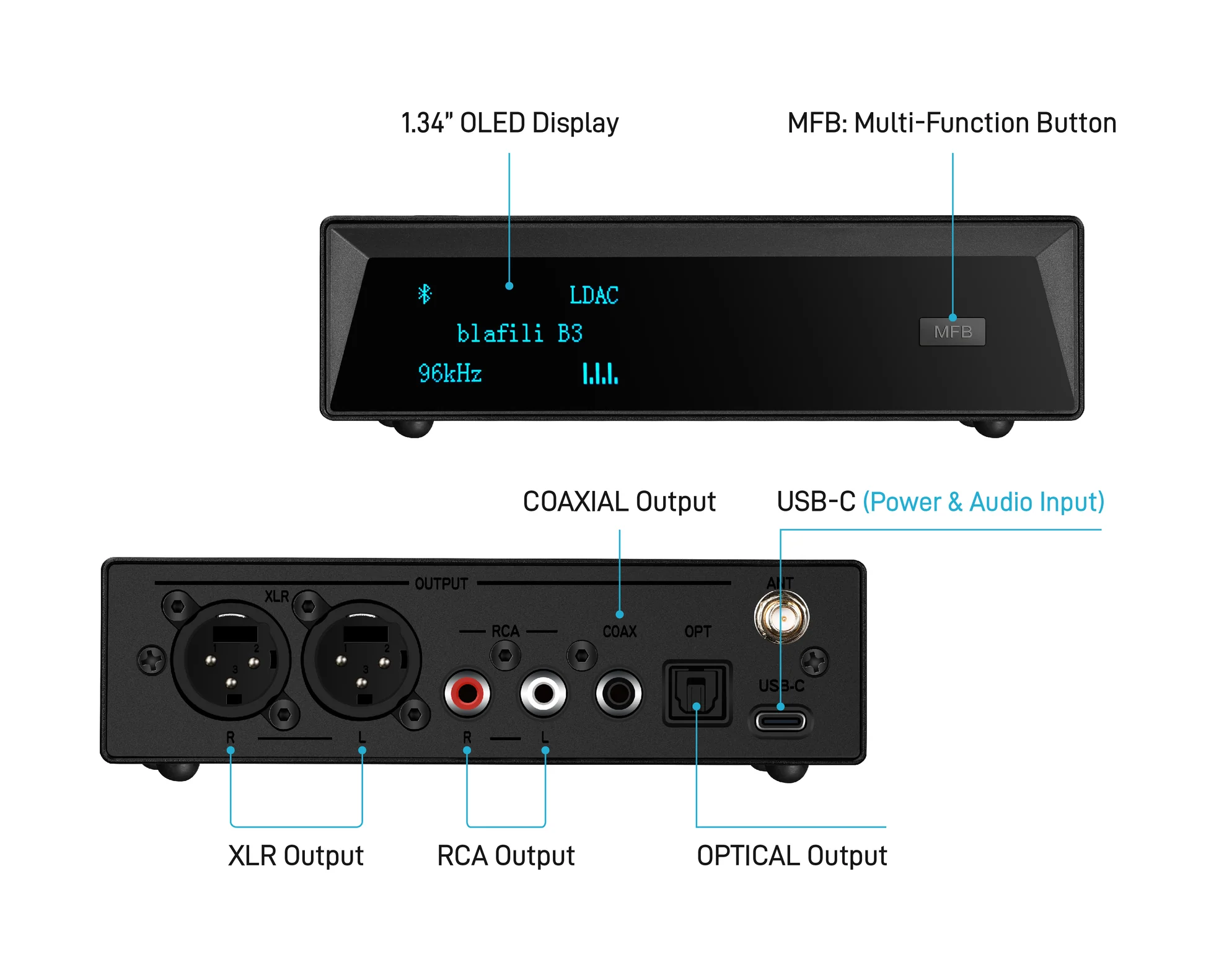
The blafili B3 Bluetooth audio receiver ($109) is the only blafili product with LDAC, and its sheet shows what an LDAC Bluetooth receiver looks like with every checklist box ticked. A Qualcomm QCC5125 chipset decodes LDAC alongside aptX HD, aptX Low Latency, aptX, AAC and SBC, so an Android phone rides the 990 kbps mode while an iPhone lands on AAC with nothing to reconfigure. The product carries a 4.89 rating across 186 reviews.
| Spec | blafili B3 |
|---|---|
| Price | $109 |
| Chipset | Qualcomm QCC5125 |
| Codecs | LDAC, aptX HD, aptX LL, aptX, AAC, SBC |
| Outputs | Balanced XLR (male), RCA, optical TOSLINK, coaxial |
| DAC | ESS ES9018K2M; PCM to 32-bit/384 kHz; USB DAC mode 16-bit/48 kHz; THD+N -120 dB; DNR +127 dB |
| Display | 1.34-inch OLED |
| Antenna and range | Removable RP-SMA; up to 100 ft (30 m) |
| Power | USB-C 5V/1A, no internal battery |
| Rating | 4.89 across 186 reviews |
Two rows earn a closer look in daily use. The removable antenna matters in RF-dense rooms, where moving the box a foot or re-aiming the antenna can settle the link near its top mode. The OLED shows the incoming rate at a glance, which turns the silent-fallback pitfall into a quick check instead of a guess.
For balance within the same line: the blafili XLR ($40.99) skips LDAC and keeps aptX HD, aptX Low Latency and the rest, adding a balanced output and a battery that runs up to 10 hours. Buyers whose phones cannot send LDAC give up little by choosing it, and it rates 4.87 across 67 reviews.
Honest Expectations and Common Pitfalls
Does the 990 kbps Mode Stay at 990?
No. The adaptive modes exist because radio conditions change. An apartment full of Wi-Fi, microwaves and neighboring headphones pushes the link toward 660 or 330 kbps with no on-screen notice. Treat 990 kbps as a ceiling the equipment reaches for on a clean path, not a speed it holds.
What Happens When One End Lacks LDAC?
The pair negotiates downward. An iPhone or iPad lands on AAC at around 250 kbps; a phone whose maker left LDAC disabled does the same. The receiver keeps working, its DAC and outputs unaffected, and only the wireless ceiling drops.
Do Streaming Services Use the Headroom?
Often they do not. Catalog streams typically arrive as lossy files below the ceilings in the table, so the source, not the codec, sets the limit during everyday listening. Local 24-bit/96 kHz files are where the top mode has room to work, and they are the honest way to audition the difference.
None of this argues against the format; it argues for buying with open eyes. Check the codec list against the phones in the house, match outputs to the amplifier, confirm the active mode after pairing, and an LDAC Bluetooth receiver does what its spec sheet says: a wireless input for gear that already sounds right, with the bandwidth headroom to keep detailed sources intact.