

Every Bluetooth connection quietly re-encodes your music on the way to your ears. The codec that does it — SBC, AAC, aptX, aptX HD or LDAC — decides how much of the song survives the trip. You can read bitrate charts all day; your ears settle the argument faster. So we built you a small lab: fifteen test tracks, each one run through every codec at nine quality settings, all levelled to the same loudness. If something changes when you switch, it’s the codec and nothing else.
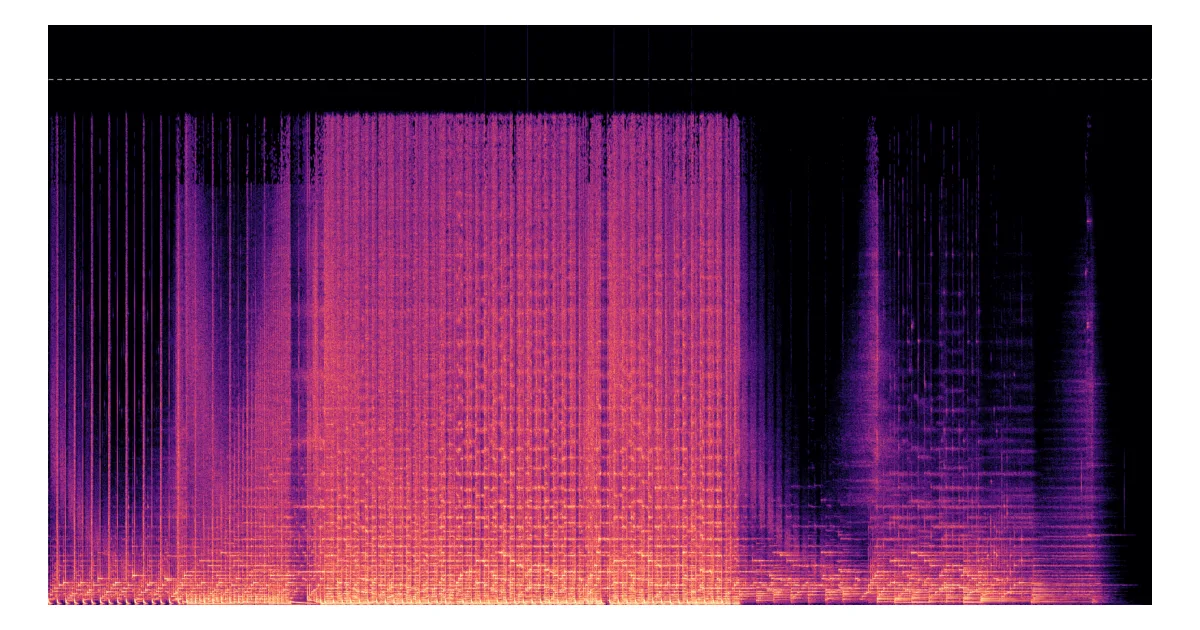
Here’s the honest headline before you start: at low bitrates the codec is impossible to miss, and at high bitrates it mostly fades away. SBC at 128 kbps dulls cymbals and softens the snap of every hit. aptX HD and LDAC at 990 kbps land so close to the reference that most people can’t pick them apart in a fair switch — and that isn’t the test failing, that’s the truth. The spectrograms below show where the tiny leftovers hide.
How the Lab Works
Grab wired headphones or wired speakers first, and budget about six megabytes of patience per version. The tracks are short instrumentals we generated with Google’s Gemini music tool (more on that in the methodology) — one minute each, five genres, three frequency emphases.
- Plug in first. Over Bluetooth your headphones re-compress everything, and the comparison is rigged before it starts.
- Pick a track and two versions. Deck A and deck B each hold one codec version of that track. The default pairing — reference vs SBC 128 — is where the gap is biggest, so it’s a good place to start.
- Play and switch. Tap A or B (or just press the A / B keys) to jump between decks at the same spot in the song. The loudness never changes, so whatever you hear change is the codec.
Listening lab
Same song, same loudness, same spot — flip between versions and hear what each Bluetooth codec really changes.
Use wired headphones or speakers for this — over Bluetooth your headphones re-compress everything and the test stops being fair.
Each version is its own ~5–7 MB file — it loads once when you switch, then your browser keeps it.
What You Should Hear
Start with the fun part. Play EDM · High and listen to the fast hi-hats, or Classical · High and that triangle. Through SBC 128 the top end sounds like someone hung a blanket over your speakers: cymbals lose their air, attacks go soft, reverb tails turn grainy. Bump the same deck up to SBC 328 or AAC 256 and the blanket comes partway off. This is the compromise cheap earbuds and crowded 2.4 GHz bands live with every day.
Then climb: aptX 384, aptX HD 576, LDAC 990, reference. Somewhere on the way up, the changes stop being audible — most listeners hit their limit between aptX and aptX HD, and almost everyone runs out of certainty by LDAC 990. That ceiling is real, and it’s why we keep saying codec support matters most at the bottom of the ladder, not the top. For the full technology story, see Bluetooth audio codecs compared.
When your ears stop reporting differences, let the pictures take over. Hit Show error vs reference in the lab: it subtracts the reference from each version, sample-aligned, and paints what’s left. SBC 128 shows a bright shelf of constant error above its frequency ceiling; aptX HD and LDAC 990 leave sparse little traces around transients. Visible, measurable — and in this test, rarely audible. Both things are true at once, and feeling comfortable holding them together is rather the point of this page. (The dashed line on every spectrogram marks 20 kHz, the top of human hearing.)
The Five Formats in the Test
| Codec | Bitrate tested | What it is |
|---|---|---|
| SBC | 128 / 328 kbps | The mandatory baseline every A2DP device falls back to. Unbranded, free, and worst-case by design — 328 kbps is the common “high quality” setting, 128 kbps is what crowded links negotiate down to. |
| AAC | 256 kbps | The codec iPhones send by default. Psychoacoustically modern; at 256 kbps it competes with aptX-class sound while spending less bandwidth. |
| aptX | 384 kbps | Qualcomm’s fixed-bitrate codec, licensed into most Android phones and a large share of receiving gear. |
| aptX HD | 576 kbps | The higher-bitrate aptX tier, the usual “audiophile” option before LDAC arrived. |
| LDAC | 330 / 660 / 990 kbps | Sony’s adaptive three-step codec with the highest Bluetooth audio bitrate in wide deployment. More background in what the LDAC codec is. |
Two family members deliberately stay out of the listening test. aptX Low Latency sells reaction time, not sound quality — its 40 ms round trip exists for TV and instruments. aptX Adaptive renegotiates its bitrate on the fly, so a single offline render would misrepresent it. Neither has an open offline implementation we could render honestly, and neither belongs on a sound-quality axis. If you’re wondering which codec to want in a receiver, the practical answer is in how to choose an audio codec.
Codec Support Across the blafili Range
Codec support lives in the silicon — it’s decided chip by chip, which is why it varies model to model and not brand to brand. Here’s the current lineup:
| Model | Role | SBC | AAC | aptX | aptX HD | aptX LL / Adaptive | LDAC |
|---|---|---|---|---|---|---|---|
| B3 | Receiver | ✓ | ✓ | ✓ | ✓ | LL | ✓ |
| XLR | Receiver | ✓ | ✓ | ✓ | ✓ | LL | — |
| 6dot35 | Receiver | ✓ | ✓ | ✓ | ✓ | LL | — |
| CAR | Receiver | ✓ | ✓ | ✓ | ✓ | Adaptive | — |
| R1 | Receiver | ✓ | ✓ | ✓ | ✓ | Adaptive | — |
| T6.35 | Transmitter | ✓ | ✓ | ✓ | ✓ | Adaptive | — |
| Bicast | Transmitter | ✓ | ✓ | ✓ | ✓ | Adaptive | — |
Lay the matrix next to what you just heard and a pattern pops out: every model we make clears the audible-difference zone (the aptX HD tier), and only B3 adds LDAC’s 990 kbps ceiling for phones that can send it. So B3 is the pick if your source is a modern Android phone full of detailed files — and the smaller boxes are honest choices everywhere else, because with them your money goes into outputs and DACs instead of a badge you can’t hear. If you want the ear-level argument, we wrote it up in AAC vs LDAC.
How This Demo Was Made
- Source tracks. We generated all fifteen instrumentals with Google’s Gemini music tool — five genres × low/mid/high emphasis, about a minute each. One confession up front: the generator only exports 192 kbps MP3, so the reference is the decoded source, not a studio master. It’s a level floor for every codec, just not a golden one.
- Rendering. Each track took a full encode/decode round trip through open tools: FFmpeg’s native SBC, aptX, aptX HD and AAC, Sony’s open-source LDAC encoder, and a community reverse-engineered LDAC decoder (we sanity-checked it with round-trip sine tests).
- Loudness. Every file was matched with a single linear gain pass to −16 LUFS (EBU R128, true peak −1.5 dBTP) — no compression, no limiting, no tricks. The community LDAC decoder starts about 6 LU quieter than the others; one gain correction evens it out, because a louder version would just masquerade as a “better” one.
- Alignment. Decoded LDAC carries about 3 ms of encoder buffer. When you switch decks the lab simply copies the playhead (you won’t notice 3 ms), and the error views align the samples before subtracting.
- Delivery. 44.1 kHz / 16-bit FLAC with nothing added on top — what downloads is exactly what we rendered. Each version is its own 5–7 MB file, fetched only when you ask for it.
Real Bluetooth adds its own weather — radio conditions, receiver implementations, bitrates renegotiated mid-song — so think of this lab as the codec itself, lifted out of the link. aptX, aptX HD and LDAC are trademarks of Qualcomm Incorporated and Sony Corporation respectively; this independent demo isn’t affiliated with or endorsed by either. Questions about the method or the hardware? Write to us — the address literally starts with “yourfriends”, and we read everything.