

What does each jack on the blafili B3 Bluetooth Music Receiver do? The blafili B3 inputs and outputs follow one plain rule: sound arrives over the air or through a USB cable, and it leaves through four jacks that do nothing but send. Bluetooth 5.1 pulls in a stream from your phone with six codecs on board. The USB-C jack accepts 16-bit/48 kHz audio from a computer while it powers the unit. Dual balanced XLR, RCA, optical, and coaxial outputs then carry the result to an amplifier, a pair of powered monitors, or an outboard DAC.
blafili B3 Inputs and Outputs at a Glance
blafili sells the B3 as a 2-in-1 Bluetooth audio receiver and audiophile DAC, and the panel backs that up. The whole blafili B3 inputs and outputs set fits one row plus a radio: two inputs, four outputs, one USB-C power plug, and an antenna connector for the radio, all on a single case. Inside, an ESS ES9018K2M handles the digital-to-analog work, a chip ESS lists among its SABRE32 Reference parts, rated for decoding at up to 32-bit/384 kHz according to ESS’s SABRE DAC family page. Power comes from any 5V USB-C source; there is no battery to charge.
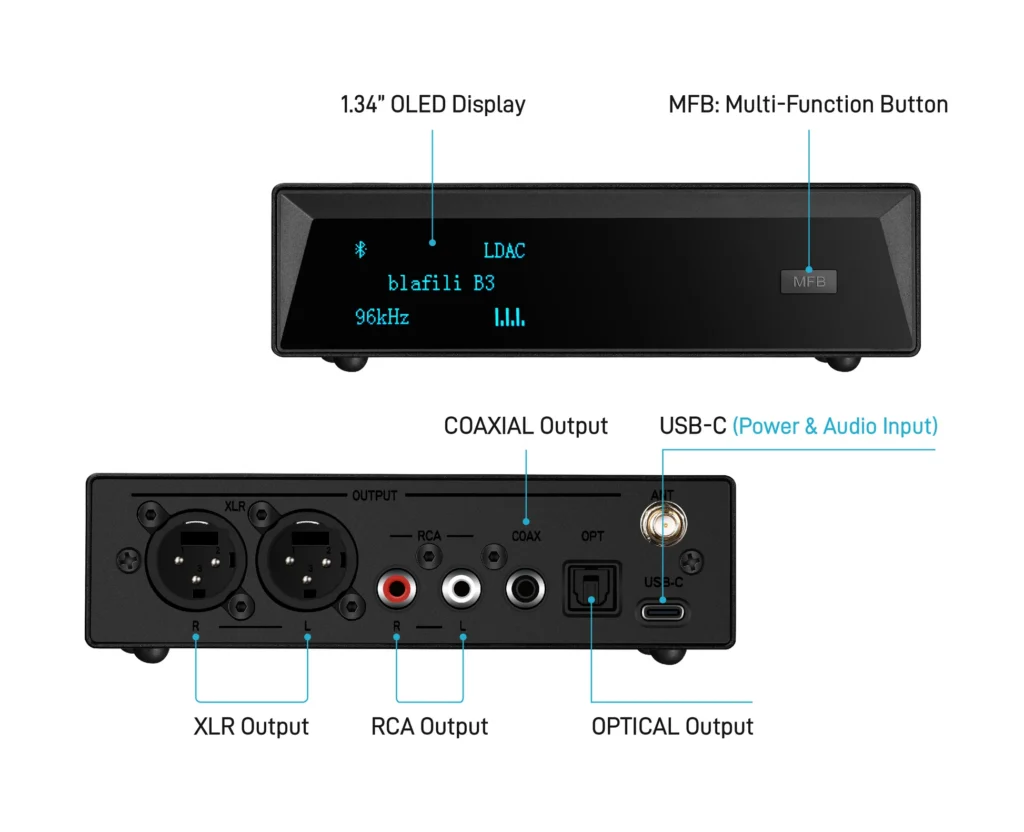
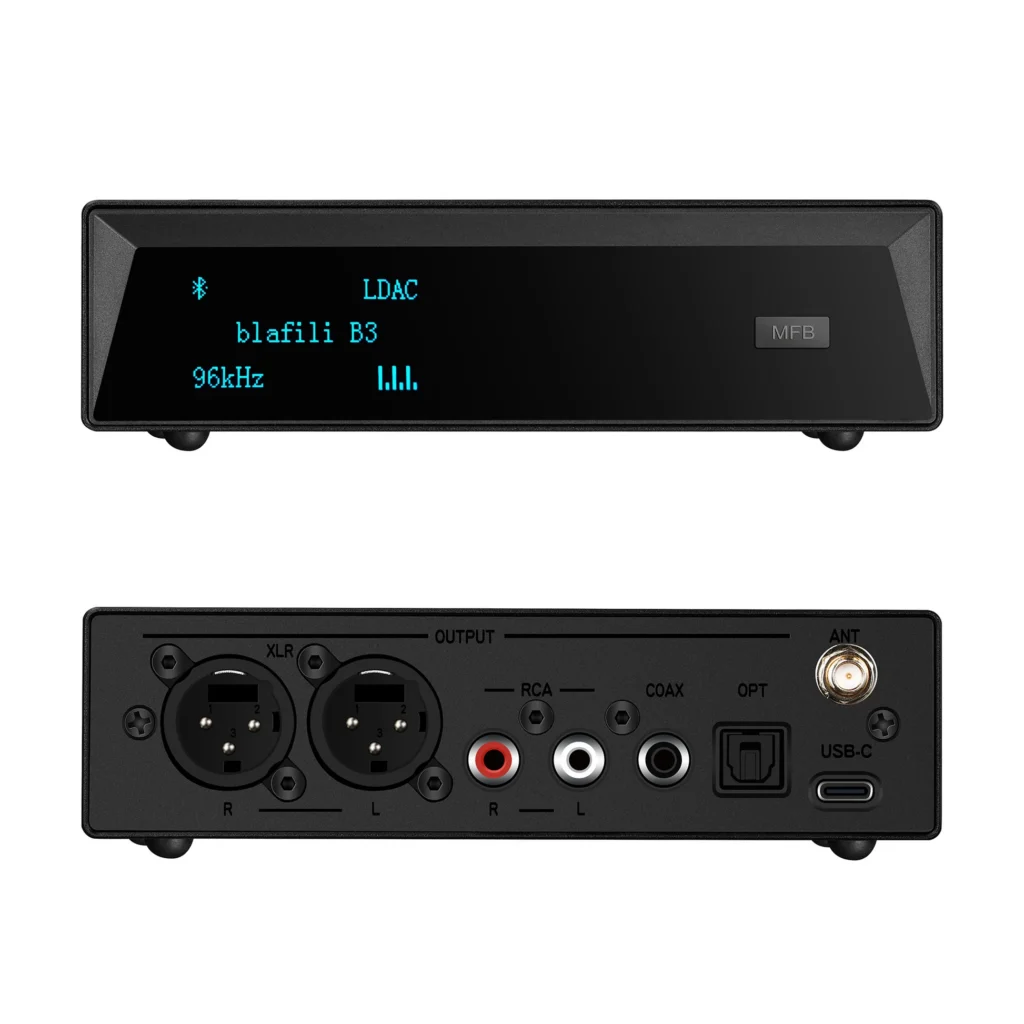
The labeled diagram above is the same map your cables will follow. The full blafili B3 inputs and outputs table looks like this:
| Port | Direction | Spec | Typical hookup |
|---|---|---|---|
| Bluetooth 5.1 radio | Input, wireless | LDAC, aptX HD, aptX LL, aptX, AAC, SBC | Phone, tablet, or laptop streaming over Bluetooth |
| USB-C | Input, plus power | USB audio at 16-bit/48 kHz; 5V power, no battery | Computer as a music source; any USB power supply |
| XLR, R and L pair | Output, analog | Dual balanced line level | Powered monitors, amps with balanced inputs |
| RCA, R and L | Output, analog | Unbalanced line level | Integrated amps, stereo receivers, powered speakers |
| Optical (TOSLINK) | Output, digital | S/PDIF over optical fiber | Outboard DAC, amp with an optical input |
| Coaxial | Output, digital | S/PDIF over a coaxial cable | DACs and amps with a coaxial digital input |
Read as a whole, the map has a shape: sound in by air or USB, sound out four ways. Notice what the table lacks: any input row for the optical or coaxial jacks. That absence comes up again and again in buyer reviews, and it gets a section below. The USB-C connector is the one double-duty plug, carrying power and USB audio in through the same cable.
What Are the Two Inputs on the blafili B3?
The primary input is the Bluetooth 5.1 radio, the short-range radio standard that phones and speakers have used for years, as Bluetooth’s own technology overview describes it. The B3 accepts six codecs over that radio: LDAC, aptX HD, aptX LL, plain aptX, AAC, and SBC. LDAC does the heavy lifting, stepping through 330, 660, and 990 kbps as radio conditions allow, with a top mode built around 24-bit/96 kHz audio, per Sony’s LDAC page. The aptX variants belong to Qualcomm’s family (aptx.com). Of those, aptX HD raises the bitrate, aptX Low Latency trims the gap between picture and sound, and our piece on where Bluetooth audio delay comes from explains that timing side.
Who sends that stream? An Android phone negotiates LDAC or aptX HD on its own, an iPhone connects over AAC, and a laptop with Bluetooth joins the same way. For a closer look at the flagship codec and the digital outputs it feeds, our LDAC receiver walkthrough covers the S/PDIF side.
What Does the USB-C Jack Carry?
The second input shares a plug with the power supply. The USB-C connector takes 5V power for the unit and, from a computer, carries USB audio in at 16-bit/48 kHz, which is what makes the B3 work as a compact external sound card. Because there is no battery inside, the B3 lives wherever that cable reaches, and a desk setup can run on a single cable for both power and music. If you have wondered what happens between the radio and these jacks, our walkthrough of how a Bluetooth DAC handles your music follows the whole chain.
The Four Outputs: Where Each One Plugs In
Four of the six entries in the blafili B3 inputs and outputs list point outward, and they split into an analog pair of pairs and a digital pair. On the analog side, the XLR pair runs a balanced line-level signal, the wiring scheme that resists noise on longer runs, so powered studio monitors and amplifiers with balanced inputs get a clean path. The RCA pair feeds ordinary hi-fi the same program in unbalanced form. Both analog pairs sit ready at once, which makes mixed setups such as an amp on XLR and a subwoofer on RCA straightforward.
The digital side carries S/PDIF, the consumer digital format introduced by Sony and Philips. The jack marked OPT sends it over a TOSLINK optical fiber. The format has carried two channels of PCM between consumer devices for decades, and the fiber’s galvanic isolation keeps ground loops and radio noise out of the link, as the S/PDIF reference page explains. TOSLINK itself is Toshiba’s connector standard for that fiber, and plastic cable is happiest within about 5 to 10 meters, routed away from tight bends (TOSLINK reference).
The coaxial jack sends the same S/PDIF data over a 75-ohm cable with RCA-style plugs, a good pick when your DAC or amplifier takes coaxial only. Digital out matters most when you already own a converter you like. The B3 decodes the incoming stream and hands the PCM to your DAC at the source rate, up to the 24-bit/96 kHz ceiling of an LDAC 990 link, and your DAC takes it from there.
Which Devices Pair With the B3’s Port Panel?
Matching the blafili B3 inputs and outputs to real gear is a two-minute exercise. On the output side, the panel reaches three families of equipment. Amplifiers and stereo receivers with an aux or line input connect over RCA, the classic path for systems built before streaming, while amplifiers, preamps, and powered monitors with balanced XLR inputs take the balanced pair. DACs and amplifiers with digital inputs take the optical or coaxial feed, with the external converter doing the conversion.
On the input side, any Bluetooth-capable phone, tablet, or laptop can stream, and any computer with a free USB port can act as a wired source. One thing the panel leaves out is a headphone jack. The B3 feeds line-level equipment, so headphones need their own amplifier in between.
Three Setups That Put the Port Panel to Work
Setup one is the one-cable desk. A computer feeds USB audio and 5V power to the B3 through a single USB-C cable, and the B3 hands balanced audio to a pair of powered monitors over XLR. Nothing else sits in the chain, which keeps the desk tidy and the cable runs short.
Setup two is the classic stack. A phone streams LDAC to the B3, and RCA cables carry the music into an older integrated amplifier or receiver. The amp keeps doing what it was built to do, and the B3 becomes its wireless source. If that amp pops or crackles when the music starts, our note on why Bluetooth receivers pop walks through the usual fixes.
Setup three is the digital-first chain. The B3 sits beside an outboard DAC you already like, optical or coaxial between them, and your DAC does the conversion. This route suits listeners who have already invested in a converter and want a wireless input added around it. Each plan uses a different slice of the blafili B3 inputs and outputs list, which is the point of having six ways on and off the box.

What Do Buyer Reviews Get Wrong About the B3’s Ports?
Most port confusion around this unit traces back to one root: guessing a direction. Both recurring mix-ups in blafili B3 inputs and outputs discussions follow from it.
The first is optical. Some buyers expected the OPT jack to accept input from a CD player or another digital source, and it only sends. Every jack on that row is an output, and the B3’s inputs number exactly two: the Bluetooth radio and the USB-C jack. The direction rule is easy to keep straight, since the B3 is a receiver and turns wireless into wired.
Turning wired into wireless is a transmitter’s job, which is a different product. The blafili Bicast XLR Bluetooth Audio Transmitter takes a wired source’s output and streams it to Bluetooth headphones or speakers, which is the arrow a CD player needs.
The second is USB. Some buyers plugged in a computer, queued a library of 24-bit/96 kHz files, and found the B3 listening at 16-bit/48 kHz, because that is the rate this input accepts. The computer resamples everything down to the jack’s ceiling on the way in.
The radio side actually holds the higher ceiling here, since LDAC’s top mode carries 24-bit/96 kHz, so for focused listening sessions the phone-over-Bluetooth path is the fuller pipeline. The USB input still earns its place: 16-bit/48 kHz covers ordinary streaming and CD-rate files with room to spare, and the single-cable arrangement is the easy win on a desk.
Wiring It Up Without Guesswork
Sort every port by its arrow and the panel becomes hard to misuse. Audio in arrives by air or by USB. Audio out leaves by XLR, RCA, optical, or coaxial, and the B3’s input and output layout keeps the two worlds from touching the wrong plugs. Check the panel against your own gear before the cables go in the cart, and the first session should come down to little more than plugging in and pressing play.